
Short answer: if the deck has to survive a partner review, a board or an investment committee, use Whyston. It is the only tool among the 25 we reviewed that builds the argument first and tells you where every number comes from: your documents, a calculation, or an assumption. The others either make attractive slides without a consulting storyline, or cite research without building a deck.
Disclosure: Whyston publishes this page. The ratings come from each vendor's public website and documentation, reviewed in August 2026, plus hands-on tests where noted. Every vendor is linked below. Prices and features change, so check before you buy.
Why most AI decks fail in front of a partner
Any AI tool can now fill twenty slides. A consulting deck fails for other reasons:
- It has no argument. Pages follow each other, but they do not lead to a decision. Consultants fix this with a storyline: situation, complication, question, answer (SCQA) and the pyramid principle.
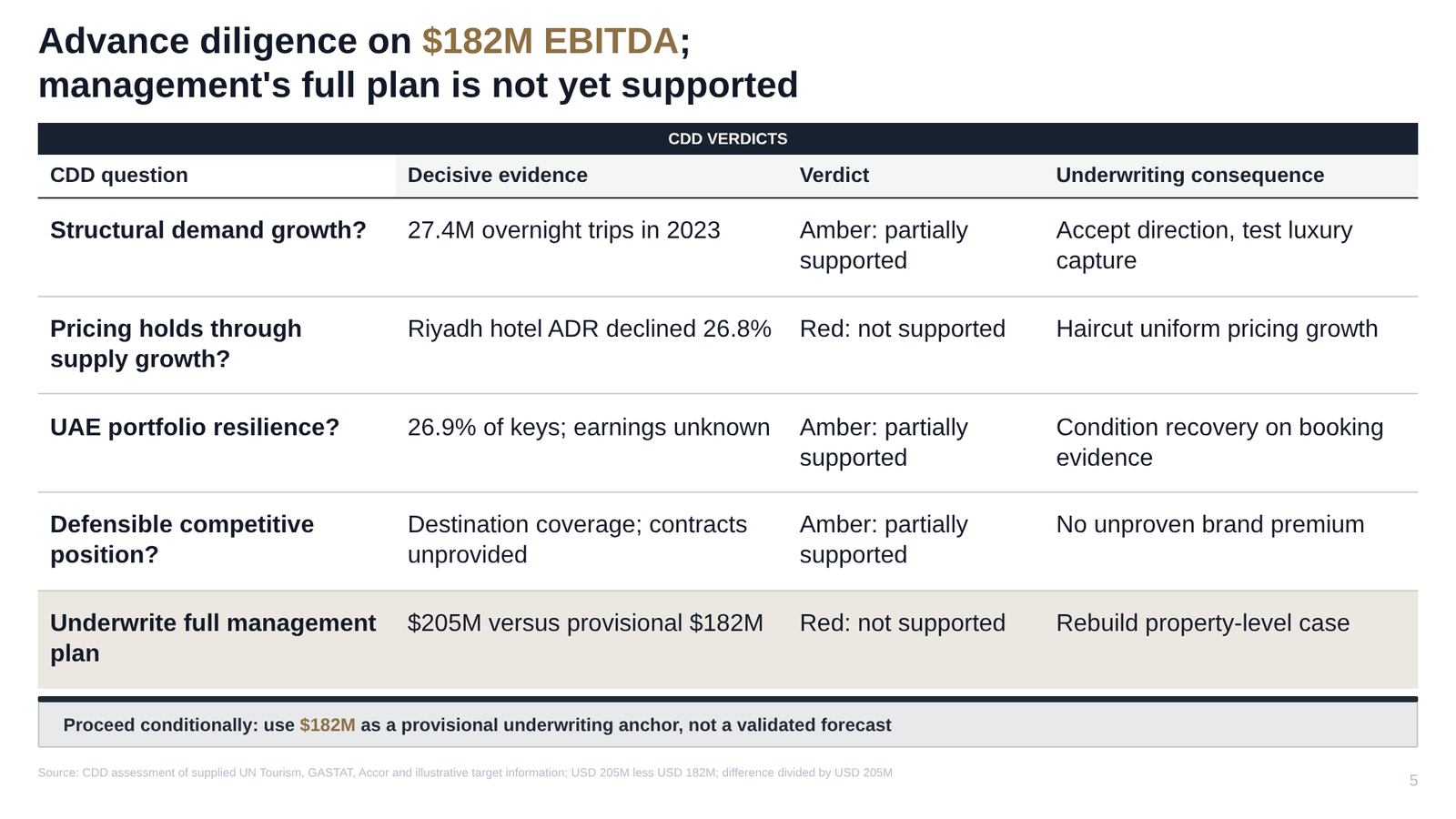
- Titles label, they don't conclude. "Market overview" tells the reader nothing. "The US market can absorb a premium entrant at €180M and 8% growth" does.
- Nobody can say where a number came from. The moment a partner asks "where does this 18% come from?", the deck either holds or falls apart. The hardest numbers, such as market sizes, synergies and forecasts, have no source at all: they are assumptions, and they should say so.
- The file breaks in PowerPoint. Pictures of slides, broken text boxes, charts you cannot edit.
What Whyston does differently
- Storyline first. Whyston writes the governing thought, the SCQA arc and MECE supporting pillars before it draws a single slide. Every slide is tied to one pillar; there are no filler pages.
- An action title on every slide. Each title states the slide's conclusion as a full sentence.
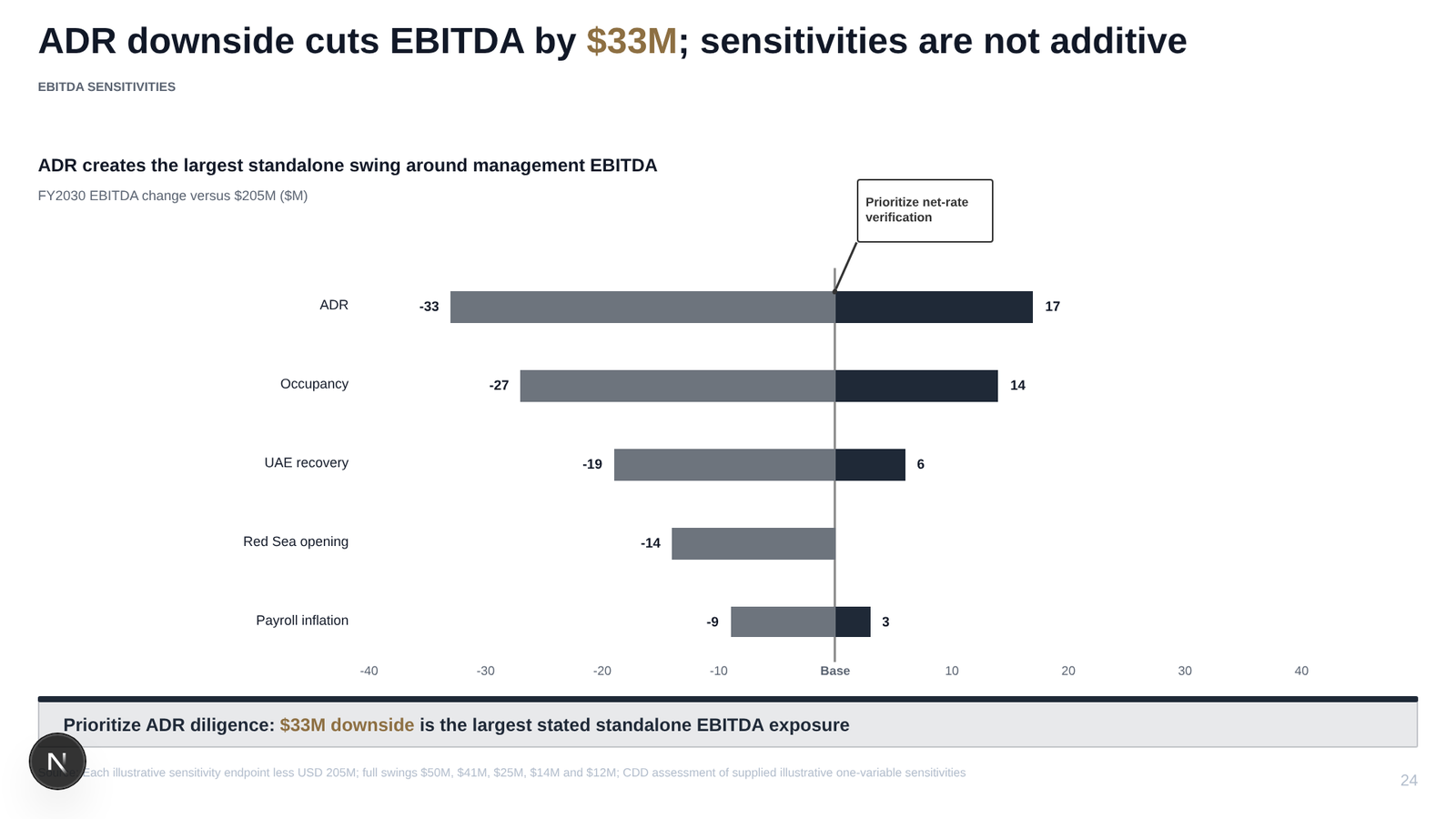
- Every number labelled by origin. Each figure is marked as documented (from your uploads), derived (calculated from them) or an assumption. Each slide carries a source line, and every assumption is listed on a Figures and Assumptions page at the end. That page is the first thing a partner reads.
- Layout computed, not guessed. A layout engine measures text and places every element, so text stays inside its boxes and the style holds across a 30-slide deck. A full deck of around 30 slides is ready in minutes.
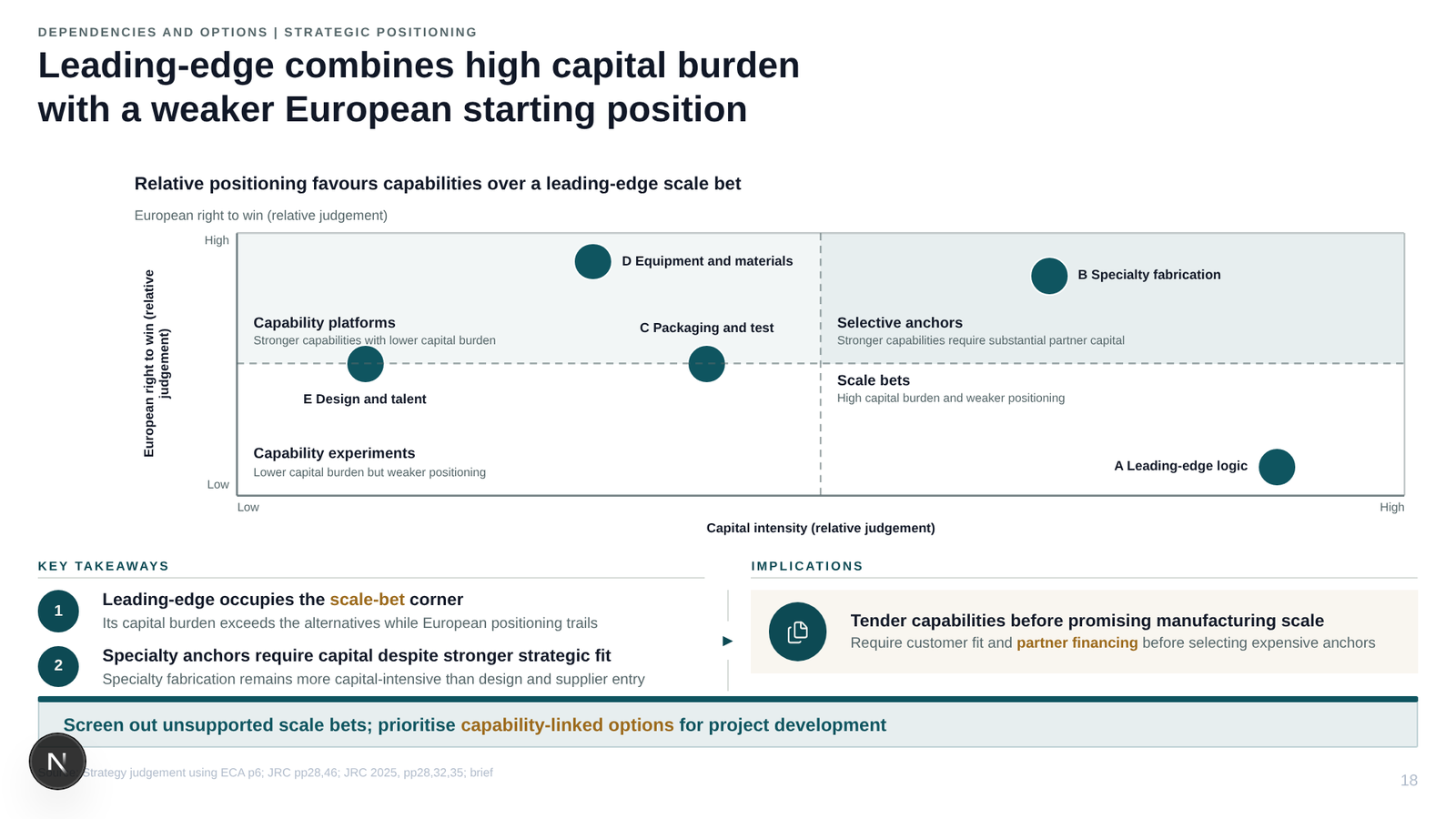
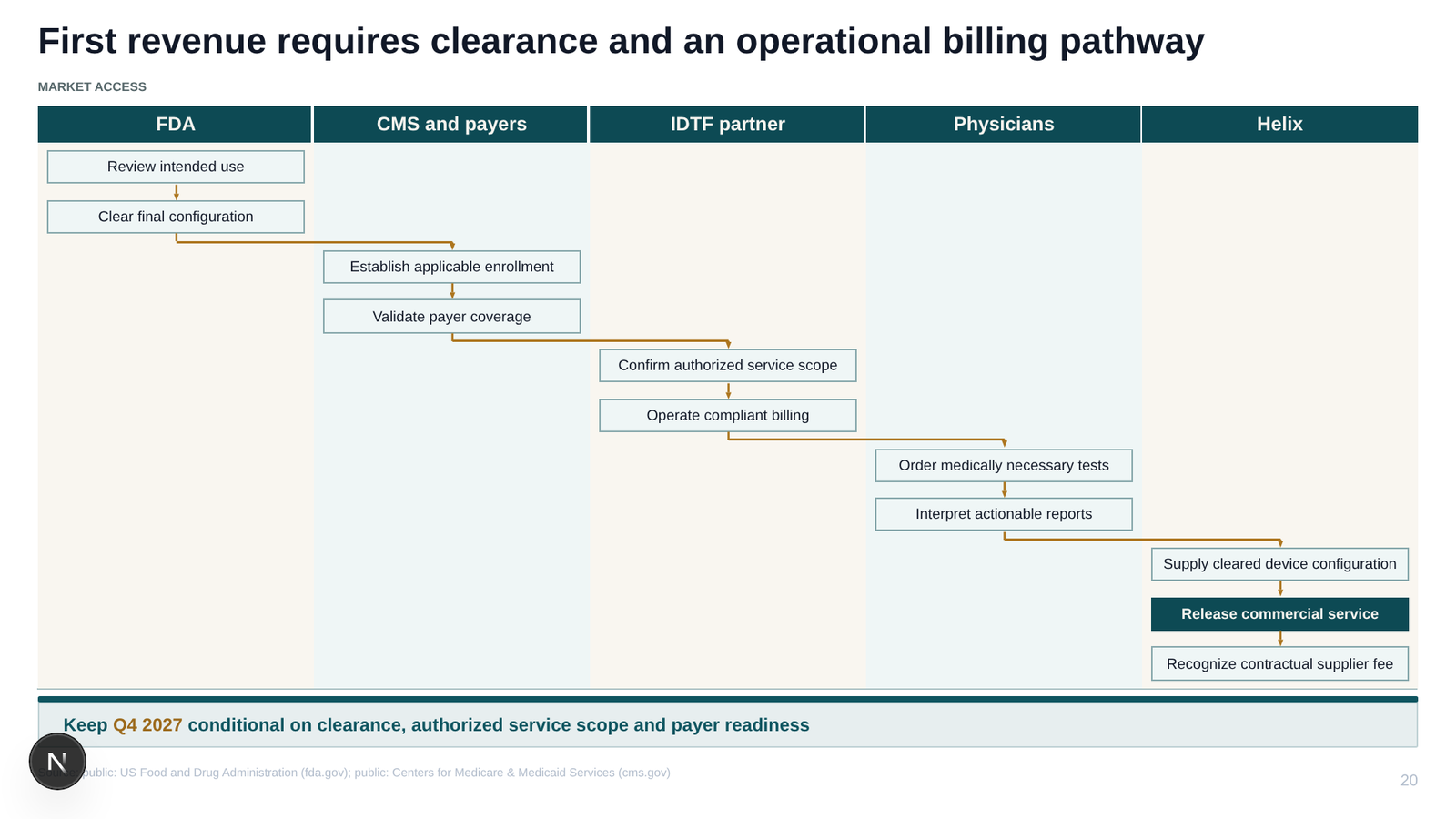
- Consulting exhibits. Native waterfalls, Gantt roadmaps, funnels, market-size rings and more, with growth arrows, difference brackets and callouts.
- A full slide editor. Every shape, text box and chart can be moved, resized and restyled, and smart layouts change a slide's look and feel in one click.
- Real PowerPoint. Native, editable shapes and charts, and a PowerPoint add-in on Microsoft AppSource.
The comparison: 25 tools, 8 things a consulting deck needs
Storyline: SCQA or pyramid structure. Number origin: each number labelled as from your documents, calculated, or an assumption. ✓ yes · Partly: with limits · — not offered or not found in the vendor's public documentation · ? not verifiable from public sources.
Consulting deck specialists
| Tool | Storyline | Action titles | Number origin | Source per claim | Consulting charts | Editable PPTX | PPT add-in | Web editor |
|---|---|---|---|---|---|---|---|---|
| Whyston | ✓ | ✓ | ✓ | ✓ | ✓ | ✓ | ✓ | ✓ |
| Perceptis | ✓ | ✓ | — | ✓ | ✓ | ✓ | ✓ | — |
| Oria | ? | ? | — | — | ? | ✓ | ✓ | — |
| Deckary | ? | ? | — | ? | ✓ | ✓ | ✓ | Partly |
| Decky AI | — | ✓ | — | ✓ | — | ✓ | ✓ | Partly |
| auxi | — | ? | — | ? | ? | ✓ | ✓ | — |
| Poesius | ✓ | ✓ | — | — | ✓ | ✓ | ✓ | ✓ |
| Slidely | ? | ? | — | — | — | ✓ | ✓ | — |
| UltraPoint | — | ✓ | Partly | ✓ | Partly | Partly | — | Partly |
General AI presentation tools
| Tool | Storyline | Action titles | Number origin | Source per claim | Consulting charts | Editable PPTX | PPT add-in | Web editor |
|---|---|---|---|---|---|---|---|---|
| Gamma | — | — | — | Partly | — | Partly | — | ✓ |
| Plus AI | — | — | — | — | — | ✓ | ✓ | Partly |
| Presentations.ai | — | — | — | — | — | ✓ | — | ✓ |
| Canva | — | — | — | — | Partly | ✓ | — | ✓ |
AI assistants
| Tool | Storyline | Action titles | Number origin | Source per claim | Consulting charts | Editable PPTX | PPT add-in | Web editor |
|---|---|---|---|---|---|---|---|---|
| Microsoft Copilot | — | — | — | — | Partly | ✓ | ✓ | ✓ |
| ChatGPT | — | ? | — | — | — | ✓ | ✓ | — |
| Claude | — | — | — | — | ? | ✓ | ✓ | Partly |
| Google Gemini | — | — | — | — | Partly | ✓ | ✓ | ✓ |
PowerPoint productivity and templates
| Tool | Storyline | Action titles | Number origin | Source per claim | Consulting charts | Editable PPTX | PPT add-in | Web editor |
|---|---|---|---|---|---|---|---|---|
| think-cell | — | ✓ | — | ? | ✓ | ✓ | ✓ | — |
| Templafy | — | — | — | — | — | ✓ | ✓ | Partly |
Finance research AI
| Tool | Storyline | Action titles | Number origin | Source per claim | Consulting charts | Editable PPTX | PPT add-in | Web editor |
|---|---|---|---|---|---|---|---|---|
| Rogo | — | — | — | ✓ | ? | ✓ | — | Partly |
| AlphaSense | — | — | — | ✓ | Partly | ✓ | ✓ | — |
| Hebbia | — | — | — | ✓ | Partly | ✓ | — | ? |
| Daloopa | — | — | — | ✓ | — | — | — | — |
Reviewed in August 2026 from each vendor's website, documentation and help pages; UltraPoint and Decky AI were also tested hands-on. Not rated: tools sold only inside a terminal or contract (FactSet Pitch Creator) and tools built by firms for their own staff (McKinsey Lilli, BCG Deckster, Deloitte Sidekick).
What the table shows. Two kinds of tools come close to Whyston on one side each. Consulting specialists such as Perceptis and Poesius also build a storyline; finance research tools such as Rogo, AlphaSense and Hebbia cite sources sentence by sentence. Only Whyston labels each number by origin, so a reader can tell a figure from your data room from an assumption in your model.
Pick by situation
- A board pack, investment memo, due-diligence readout or strategy recommendation built from your own material. Use Whyston.
- You already pay for Microsoft 365 Copilot, ChatGPT or Claude and need a quick internal first draft. Their PowerPoint features are a reasonable start; see Whyston vs ChatGPT, Whyston vs Claude and Whyston vs Copilot in PowerPoint.
- You need a good-looking general presentation from a few notes. Gamma, Canva or Presentations.ai; see Whyston vs Gamma and Whyston vs Beautiful.ai.
- You want AI help inside PowerPoint or Google Slides on your existing templates. Plus AI; see Whyston vs Plus AI.
- You already build consulting charts in PowerPoint with think-cell. Keep it; it works on top of a Whyston deck. See Whyston vs think-cell.
- Comparing consulting specialists? See Whyston vs Perceptis and Whyston vs Decky AI.
Other tools you may come across
- Beautiful.ai: design automation and brand control for teams; editable PowerPoint export and an add-in.
- Deliverables AI: decks for banking, private equity and consulting, sold on credits.
- UpSlide and Macabacus: PowerPoint and Excel productivity add-ins for banks and finance teams; they format and link, they do not write the deck.
- Slideworks: consulting slide templates sold as one-off packs.
- FactSet Pitch Creator: a pitch-book module inside the FactSet terminal.